Free Airbnb Expense Spreadsheet for Hosts (Schedule E Template)
A free Airbnb expense spreadsheet for hosts. Track income and expenses, see your real profit, and watch every category map to the right Schedule E line. Plus the one tax question most hosts get wrong.


My parents are moving into an assisted living place this year. They've spent decades in a house on a lake, and none of us could stand the idea of selling it. So we're going to turn it into an Airbnb and keep it in the family.
That decision sent me down a rabbit hole. I run Shoeboxed, so I think about taxes more than most people, and my first thought wasn't about photos or pricing. It was this: how do I run a real profit and loss on this thing, and which tax form does the income even go on?
I went looking for a simple spreadsheet to track it. Same story as always. The free ones online were a wall of tabs, a pitch for software, or a roundup of other people's templates. Not one of them answered the first real question every host has to answer, which is the one that changes your whole tax bill.
So I built my own, and it's free. It's an Airbnb expense spreadsheet for hosts, built around how the IRS wants you to report a short-term rental. You log what comes in and what goes out. It shows your real profit, with every category mapped to the right line on your tax return.
Get the Airbnb expense spreadsheet
Copy the template to my Google Drive →
Tap it, sign in to Google, and choose Make a copy. The sheet is now yours to type in, and nothing you enter touches my version.
Prefer Excel? Download it as an Excel file (xlsx).
The sheet has two main tabs and three bonus tabs:
- Rental P &L (Schedule E). Your profit and loss. It fills in by itself and shows what you made.
- Transactions. Where you do the work, with one row every time money moves.
- Bonus tabs. A depreciation estimator, a mileage log, and a 25% off code for Shoeboxed.
Here's the part I'm proudest of: every expense category is labeled with the Schedule E line it belongs on. The mileage log feeds line 6, and the depreciation estimator feeds line 18. So when you hand the totals to your accountant, every number already knows where it goes.
If you only do one thing on this page, copy the template. The rest of this article explains how it works and the tax part I had to learn to build it.
Which form is your Airbnb on: Schedule E or Schedule C?
This is the question I had to answer before I could build anything, and most hosts get it backward.
Your Airbnb income goes on one of two forms, and the difference is real money. Most hosts report on Schedule E , and that income skips self-employment tax. A few hosts report on Schedule C , and that income owes self-employment tax, a 15.3% hit on your profit that Schedule E skips. Same rental, a much bigger bill.
So which one is you? For almost every host the answer is Schedule E, but here's how to know for sure. The line is whether you provide what the IRS calls "substantial services." The IRS says it plainly:
You can generally use Schedule E (Form 1040), Supplemental Income and Loss to report income and expenses related to real estate rentals. If you provide substantial services that are primarily for your tenant's convenience, report your income and expenses on Schedule C (Form 1040).
Here's where people slip up. Cleaning the place between guests is not a substantial service. Neither is leaving fresh sheets for the next booking, or paying the electric bill and hauling the trash.
Publication 527 draws the line at hotel-style service for the guest who's staying there:
If you provide substantial services that are primarily for your tenant's convenience, such as regular cleaning, changing linen, or maid service, you report your rental income and expenses on Schedule C.
The same page lists what doesn't count, and it covers most of what a normal host does:
Substantial services don't include the furnishing of heat and light, cleaning of public areas, trash collection, etc.
So here's the map:
| Your setup | Form | Self-employment tax? |
|---|---|---|
| Normal whole-home rental: clean between guests, fresh linens, stock supplies | Schedule E | No |
| Rent a room, still a normal rental | Schedule E | No |
| Hotel-style service: daily cleaning during the stay, meals, concierge | Schedule C | Yes |
| The fork is about hotel-style service for the guest, not the cleaning you do between guests. |
Our lake house will be a normal whole-home rental. Guests get the place to themselves, we clean and restock between bookings, and that's it. That's Schedule E, with no self-employment tax. You'd have to run it like a bed and breakfast, with daily maid service and meals, to land on Schedule C.
The template is built for the Schedule E case, because that's where almost every host belongs.
When your Airbnb income is tax-free: the 14-day rule
Before you track a single dollar, check one thing. If you rent out a home you also use yourself for fewer than 15 days in the year, the income is tax-free, and you report none of it.
This isn't a loophole. It's a real rule, and the IRS spells it out:
There's a special rule if you use a dwelling unit as a residence and rent it for fewer than 15 days. In this case, don't report any of the rental income and don't deduct any expenses as rental expenses.
It comes from the same part of the tax code as the Augusta Rule. Say you live near a spot that fills up once a year, like a big game or a festival. You can rent your own home for that weekend and keep every dollar tax-free. You don't deduct expenses for those days, but on a 14-day rental there's almost nothing to deduct anyway. For a place that's booked all season this won't apply, but for an occasional host it's the best deal in the tax code.
The half-a-ledger problem
Now the part that surprised me, and it comes straight from our own customer data.
We pulled two years of receipts from 211 Shoeboxed accounts that track lodging and rental expenses, the accounts that look like Airbnb and short-term-rental hosts. Then we checked how many of them ever recorded a single dollar of income coming in, not just money going out.
The answer was 39, out of 211. More than 80% of these host accounts never logged a dollar they earned, and tracked only what they spent.
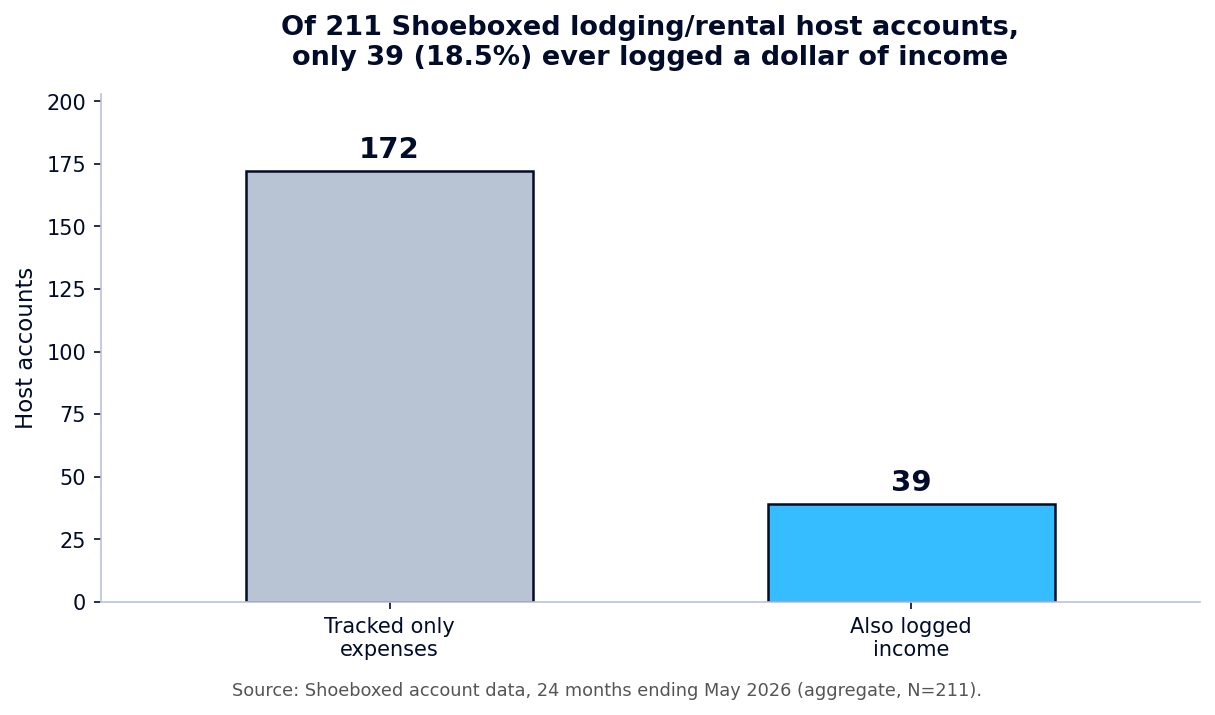 Of 211 host accounts, only 39 ever logged a dollar of income.
For a host, that's the one mistake you can't afford. Your rental income is line 3 of Schedule E, the top of the form. If you don't track what you earned, you can't even start your return, and you're left guessing at your profit. Guessing is how you either overpay or get a surprise in April.
There's a sneaky version of this, too. The cleaning fee your guest pays you is income, even when you hand it straight to your cleaner. You report the fee you collected as rent, and you deduct what you paid the cleaner. (Paying that cleaner by paper check? Here is how to write a check.) The template makes you pick Income or Expense on every row, so the money you earn never goes missing.
Every host expense, mapped to its Schedule E line
When I started, I had no idea what counted as a rental expense or where it went. Turns out the IRS already made the list. It's Part I of Schedule E, and the template uses those exact lines so nothing gets lost.
The left side below is what you'd call it day to day, and the right side is the line on your tax return.
| What you spent money on | Schedule E line |
|---|---|
| Listing photos, ads, boosted listings | Advertising (line 5) |
| Driving to the property for turnovers and supplies | Auto and travel (line 6) |
| Cleaners, lawn care, normal upkeep | Cleaning and maintenance (line 7) |
| Airbnb and VRBO host fees | Commissions (line 8) |
| Short-term rental insurance | Insurance (line 9) |
| Co-host or property manager pay | Management fees (line 11) |
| Mortgage interest on the rental | Mortgage interest (line 12) |
| Plumber, handyman, fixing what breaks | Repairs (line 14) |
| Coffee, soap, paper goods, guest amenities | Supplies (line 15) |
| Property and occupancy taxes | Taxes (line 16) |
| Electric, water, gas, internet, cable | Utilities (line 17) |
| The template's categories are the actual Schedule E Part I lines. Pick a category, and the line number rides along. |
Those category names aren't something I made up, and they aren't software jargon. They're the lines on the form you'll file, which is the most legit source there is. We looked at what our 211 hosts spend on most. The same buckets came up again and again: cleaning and supplies, utilities, repairs, host fees, and the drive to the property. The template leads with those, so most of your rows have an obvious home.
The two lines hosts trip on: depreciation and mileage
Two of the biggest deductions a host gets don't work like a normal receipt. They each have their own spot, and the template handles both for you.
Mileage goes on line 6. Every drive to the property counts: the turnover after a checkout, the supply run, the trip to meet the plumber. You log your trips on the Mileage Log tab at the 2026 rate of $0.725 per mile, the sheet does the math, and the total flows into Auto and travel on line 6. A 40-mile round trip to the lake is worth about $29, and that adds up fast over a season of turnovers.
Depreciation goes on line 18, and it 's the one most hosts get wrong. You don't deduct the price of the house or the furniture all at once. You spread it out. Publication 527 is clear about this:
You can't simply deduct your mortgage or principal payments, or the cost of furniture, fixtures, and equipment, as an expense. You can deduct depreciation only on the part of your property used for rental purposes.
The building gets written off over 27.5 years, the furniture and appliances over 5 years, and the land never. The Depreciation Estimator tab does the math: enter what you paid, subtract the land value (your property tax bill splits the two), and it figures your yearly write-off.
In the template's sample year, the lake house brings in about $16,500 in cash, but depreciation knocks the taxable profit down to about $3,500. That's not a trick. Depreciation is what makes owning a rental tax-friendly.
Two honest catches, though. Depreciation isn't free money, it's a delay: when you sell, the IRS takes some of it back as depreciation recapture, taxed up to 25%. And if a write-off pushes you to a paper loss, the passive activity rules can stop you from using that loss this year. Depreciation is worth taking, but it's the one line I'd hand to a CPA.
If you live there too: splitting personal and rental use
If your Airbnb is a dedicated rental all year, this part is easy. It's 100% rental, and you can skip ahead.
But a lot of hosts rent a place they also use themselves, a spare room, a basement, or the lake house for the weeks the family isn't there. When you both live in it and rent it, you split your expenses between rental days and personal days. The IRS sets the test:
You're considered to use a dwelling unit as a residence if you use it for personal purposes during the tax year for a number of days that's more than the greater of: 14 days, or 10% of the total days you rent it to others at a fair rental price.
In plain terms: count your personal nights and your rented nights. If your personal use crosses that line, you can only deduct the rental share of your utilities, repairs, and everything else. There's one more catch: once the place counts as your residence, your deductions can't drop you into a loss. They stop at your rental income, and the rest carries to next year. Keep an honest count of the nights, because that ratio decides how much of every expense you get to claim.
The mistakes that cost hosts at tax time
Here are the traps I found while building this, the ones that quietly cost hosts money. The good news is they're all easy to avoid.
Forgetting the income side. This is the big one, and our data shows how common it is. How you lose the deduction: without the income side, your books can't show your profit at all, and you're filing on numbers you made up. Log every payout and every cleaning fee as income, the day it lands.
Mixing personal and rental money. When your grocery run and your guest-soap run go through the same account, you can't tell what's deductible. How you lose the deduction: at audit time, a rental expense buried in a personal account with no clear record is the easiest thing for the IRS to throw out. Open a separate account and card for the rental, and the deductions stay clean.
Treating the whole mortgage payment as an expense. Only the interest is deductible, not the principal, and the building gets handled through depreciation. How you lose the deduction: counting the full payment inflates your expenses and makes your books wrong. Put the interest on line 12 and let the Depreciation Estimator handle the building.
How long to keep the records
Short version: three years for most things, but longer for anything tied to the property itself.
The IRS's own guidance says to "keep records for 3 years" in the normal case, measured from the date you filed. That covers your routine income and expense receipts.
The one exception that matters for a rental: keep everything tied to the property's cost, the purchase, the improvements, the depreciation you've claimed, until at least three years after you sell it. Those records set your basis (what the place cost you for tax purposes), and your basis decides your tax when you sell. Keep the scan and toss the paper. The digital copy outlives the original and is far easier to find years later.
The easy way is to skip the spreadsheet
I built this template, and I stand behind it. But I'll tell you the truth: the typing is the part nobody enjoys. Our customer data shows what happens when it's a chore. People stop logging income, categories stay blank, and the books drift.
That's the whole reason Shoeboxed exists. We're a 20-year-old receipt scanning and mileage tracking app, and we do the typing for you. Snap a receipt, forward a booking email, or mail us a shoebox of paper in our Magic Envelope. Our team in Durham scans the paper ones and pulls out the date, total, tax, vendor, and category. Your totals land in your account, ready to drop into a sheet like this.
The mileage piece is my favorite for hosts. The app tracks every drive to the property by GPS, texts you the list at the end of the day, and you reply which ones were business. A tax-ready mileage log builds itself for line 6, with no notebook in the glove box. (The full writeup is in our mileage log template article.)
Either way, the template is yours, free and no strings. If you want to keep doing it by hand, it'll serve you well. If you'd rather have the receipts and mileage captured for you, that's what we're here for.
Shoeboxed Pro is $29 a month with a 30-day risk-free trial. Scan a season of receipts, and if it isn't for you, we refund the money.
Start a Shoeboxed account → or grab the iPhone app or the Android app.
If you want to go deeper, we've got plain-English guides on the accounting spreadsheet for Schedule C filers, a simple income and expense worksheet, and a Google Sheets expense tracker for businesses that aren't rentals.
Helping you keep more of your hard-earned money is the whole point.
30 Seconds Could Save You Thousands on Taxes
Self-employed? Get an instant, personalized tax-savings estimate.




 4.4 / 5 on