Free Google Sheets Accounting Template for Small Business Taxes (Schedule C Filers)
A free Google Sheets accounting template for sole proprietors and single-member LLCs. Track income and expenses, see your profit, and watch mileage and the home office flow right onto your Schedule C.


I spent 25 years as a W-2 employee, and taxes were simple. A form showed up in the mail, the numbers were already filled in, and I typed them into software once a year.
Then I bought Shoeboxed, and for the first time I had real self-employed income. Everyone talks about the tax savings you get on a Schedule C: the home office, the mileage, the Augusta Rule. I was excited to claim all of it.
I went looking for a simple way to track everything, and I came up empty. The free templates online were either a wall of tabs I didn't understand, a sales pitch for software, or a roundup of other people's spreadsheets. None of them showed me the one thing I wanted, which is how the money I track turns into the number on my tax return.
So I built my own, and it's free. It's a Google Sheets accounting template built for sole proprietors and single-member LLCs who file a Schedule C. You log what comes in and what goes out, and it shows you your profit, your balance sheet, and exactly how your mileage and home office land on the form.
Get the accounting template
Copy the template to my Google Drive →
Tap it, sign in to Google, and choose Make a copy. The sheet is now yours to type in, and nothing you enter touches my version.
Rather work in Excel? Download it as an Excel file (xlsx).
The sheet has three main tabs and three bonus tabs:
- Income Statement. Your profit and loss. It fills in by itself and tells you whether you made money.
- Balance Sheet. What your business owns and what it owes.
- Transactions. Where you do the work, with one row every time money moves.
- Bonus tabs. A home office log, a mileage log, and a 25% off code for Shoeboxed.
Here's the part I'm proudest of: every expense category is labeled with the Schedule C line it belongs on. The mileage log feeds line 9, and the home office log feeds line 30. So when you hand the totals to your accountant, every number already knows where it goes.
Categories are step 3 of the five-step accounting cycle, and the template handles the sorting for you.
If you only do one thing on this page, copy the template. The rest of this article explains how it works and why it matters.
What bookkeeping actually does
I'll keep this plain, because nobody taught me this and I wish they had.
Bookkeeping is just tracking every dollar that moves through your business:
- Money in and money out
- Credit-card charges
- Loans and big purchases, like equipment
You write each one down and tag what it was for.
Do that, and your records answer two questions that run your whole tax life:
- How much money did the business make?
- What does the business own, and what does it owe?
That's it. Question one is your income statement, and question two is your balance sheet. Everything else is detail.
A tax podcast I listened to recently put the first question better than I can. The host on the Small Business Tax Savings Podcast said most owners treat bookkeeping as something they clean up at tax time, and that's where the trouble starts. If your books are a mess in April, you're planning your taxes on bad numbers, and you leave money on the table. Clean books all year are the tax strategy.
Your Schedule C is a profit and loss statement
Here's the thing that finally made it click for me.
If you file a Schedule C, you already fill out a profit and loss statement every year. That's all the form is. The top half is your income, the bottom half is your expenses, and you subtract one from the other to get your profit.
The IRS says it in the Schedule C instructions, in the plainest language they ever use:
Subtract line 30 from line 29. The result is your net profit.
So the Income Statement tab in the template isn't some accountant's invention. It's your tax return, built as you go. Income minus expenses equals profit, and that profit, on line 31, is the number you pay tax on.
Here's the trap that catches almost everyone, the one the podcast nailed: your profit is not the money sitting in your bank account. Say your account shows $4,000, but a $3,000 tax bill and a card payment are due next week. Your balance is just the cash sitting there at one moment, while your profit is the part you actually keep. Only one of those gets taxed, and it's the one most people never calculate.
The second tab, the Balance Sheet, answers the other question. Add up what you own, subtract what you owe, and what's left is your real stake in the business. It takes five minutes, and it's the fastest gut-check on where you stand.
The half-a-ledger problem
Now the part that surprised me, and it comes straight from our own customer data.
I pulled two years of receipts from 3,017 Shoeboxed accounts that are active bookkeepers, meaning they scanned at least 100 receipts each. That's almost two million receipts.
Then I checked how many of those accounts ever recorded a single dollar of income coming in, not money going out. The answer was 108, out of 3,017.
More than 96% of active small-business accounts never logged a dollar they earned. They tracked only what they spent.
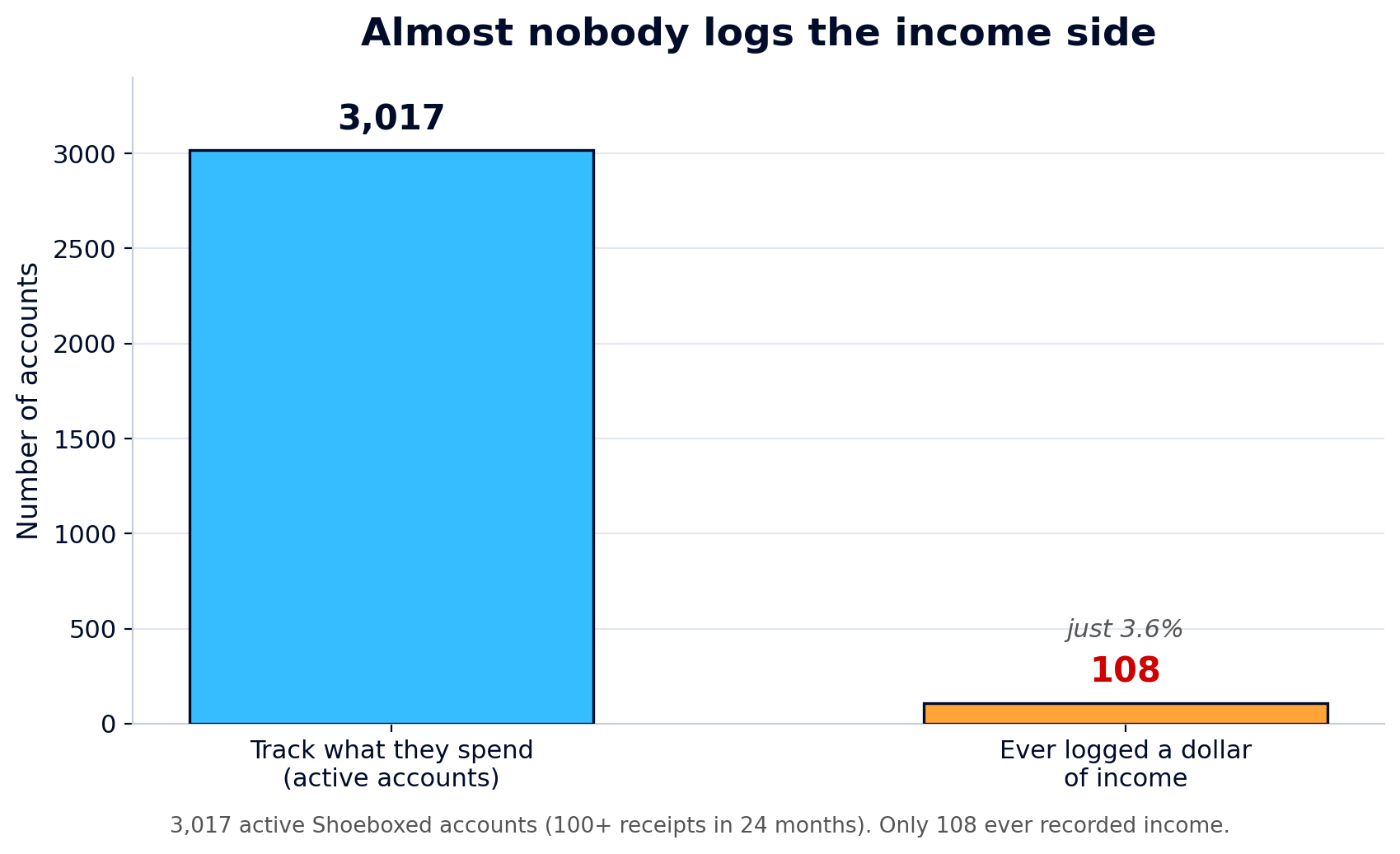 Of 3,017 active Shoeboxed accounts, only 108 ever logged a dollar of income.
Now, I'll be honest about why. Shoeboxed is a receipt scanner, and receipts are money going out, so some of that gap is by design. But it matches what I see everywhere else, in my own books and in friends' businesses: people track what they spend and almost never track what they earn in the same place.
That's half a ledger, and half a ledger can't answer question one. If you record only expenses, your spreadsheet can't tell you your profit, because it never saw your income. You're left guessing, and guessing at your profit is how you either overpay your taxes or get a surprise in April.
The template fixes this by making you pick Income or Expense in the Type column on every row. It's one extra click, and it's the click that turns a pile of expenses into a real set of books.
Every expense, mapped to its Schedule C line
When I started, I had no idea what counted as a business expense or where it went. Turns out the IRS already made the list for me. It's Part II of the Schedule C, and the template uses those exact categories so nothing gets lost.
Here's the map. The left side is what you'd call it day to day, and the right side is the line on your tax return.
| What you spent money on | Schedule C line |
|---|---|
| Ads, website, business cards | Advertising (line 8) |
| Business miles you drove | Car & truck (line 9) |
| Pay to contractors and freelancers | Contract labor (line 11) |
| Business insurance premiums | Insurance (line 15) |
| Accountant, lawyer, bookkeeper | Legal & professional (line 17) |
| Software, postage, office stuff | Office expense (line 18) |
| Supplies you use up | Supplies (line 22) |
| Flights, hotels, work travel | Travel (line 24a) |
| Business meals (half is deductible) | Meals (line 24b) |
| Phone, internet, electric, water | Utilities & phone (line 25) |
| The template's categories are the actual Schedule C Part II lines. Pick a category, and the line number rides along. |
Those category names aren't something I made up, and they aren't QuickBooks jargon. They're the lines on the form you already file, which is the most legit source there is.
One tax rule is baked into the template: business meals are deductible at 50%, not the full amount, under IRS Publication 463. So a $60 client lunch becomes a $30 deduction, and the Income Statement tab does that math for you. A meal you enter at full price shows up at half on your return.
When I looked at what our 3,017 bookkeepers buy most often, the same categories came up again and again: meals, auto and fuel, office supplies, travel, phone and internet, professional fees. The template leads with those, so most of your rows have an obvious home.
How mileage and the home office flow onto your Schedule C
This is the part I couldn't find anywhere else, and it's the reason I built the template instead of downloading one.
Mileage and the home office are two of the biggest deductions a Schedule C filer gets, but they don't work like a normal receipt. They each have their own spot on the form, and the template sends them there for you.
Mileage goes on line 9. You log your trips on the Mileage Log tab at the 2026 business rate of $0.725 per mile, the sheet multiplies your miles by the rate, and that total flows straight into Car & truck on line 9 of your Income Statement. Drive to a client, to a job site, or to the post office for the business, and it all counts. A 40-mile round trip is worth $29, and doing that twice a week adds up to about $3,000 a year.
The home office goes on line 30. This one sits on its own line, below all your other expenses, and it comes off your profit right before the final number. The template gives you both ways to figure it on the Home Office Log tab:
- The simplified way. $5 per square foot, up to 300 square feet, for a maximum of $1,500. The IRS spells it out: "$5 per square foot of home used for business (maximum 300 square feet)." No receipts to keep.
- The actual way. You enter your home's total square footage and your office's square footage, and the sheet figures your business-use percentage and applies it to your rent or mortgage interest, utilities, insurance, and repairs. Say your 200-square-foot office sits in a 2,000-square-foot home, which is 10%. On $24,000 a year of rent, utilities, and insurance, that's a $2,400 deduction, well past the $1,500 cap on the simplified method.
The Home Office Log tab works out both methods, so you can see which one is bigger. Pick that one at the top of the tab, and the template carries it to line 30 for you. If you'd rather have it done for you, our free home office calculator pulls your home's square footage from your address and runs both methods in about 30 seconds.
So the bottom of your Income Statement reads like the bottom of your Schedule C: income, minus your expenses, minus your home office, equals your net profit. The deductions don't sit in a side tab hoping you remember them. They land on the line.
The tax strategy everyone talks about, and why you can't use it yet
When I got into this, the Augusta Rule was everywhere. The pitch is great: rent your home to your business for up to 14 days a year, and that rental income is tax-free to you. People online act like it's free money for every business owner.
So I read the law itself. It's Section 280A(g), and the tax-free part is real: if your home is "rented for less than 15 days during the taxable year," then the rental income "shall not be included in the gross income."
But there's a catch nobody mentions, and it's a big one. The Augusta Rule only saves you money when a separate business entity pays you the rent. The business deducts the rent, and you leave it off your income, because you're two different taxpayers.
If you're a sole proprietor, you and your business are the same taxpayer. You'd be renting your home to yourself, which gets you nothing. The same law says no deduction is allowed, and Publication 334 backs it up: "You can't deduct your own salary or any personal withdrawals you make from your business."
And here's the part that trips people up the most: forming an LLC doesn't change this. The IRS treats a single-member LLC as "an entity disregarded as separate from its owner," which is a fancy way of saying it's taxed the same as a sole proprietor, on the same Schedule C. The LLC label alone gets you no Augusta Rule.
What matters is whether your business files its own separate tax return. Here's the line:
| Your setup | Files | Augusta Rule? |
|---|---|---|
| Sole proprietor | Schedule C | No |
| Single-member LLC (default) | Schedule C | No |
| LLC taxed as an S-corp | 1120-S | Yes |
| Partnership (multi-member LLC) | 1065 | Yes |
| S-corp or C-corp | 1120-S / 1120 | Yes |
| The Augusta Rule needs a separate business return. Sole props and default single-member LLCs file a Schedule C, so it doesn't apply to them yet. |
I'm telling you this because I wish someone had told me. If you file a Schedule C, the Augusta Rule isn't yours, and that's fine. Your mileage and your home office are real, they're big, and they flow right onto your return today. Chase those first. The Augusta Rule is a reason to talk to a CPA about an S-corp, a setup where your business files its own separate tax return, once your profit is high enough to justify it.
The bookkeeping mistakes that cost you at tax time
Here are a few traps I learned the hard way, or watched friends fall into. The good news is they're all easy to avoid once you know them.
Waiting until tax season. If you save it all for April, you're not doing your books, you're reconstructing a year from memory. You'll forget deductions, and you'll have no time to plan. Ten minutes a week beats one miserable weekend.
Mixing business and personal. When your personal coffee and your business software run through the same account, you can't tell what's deductible. How you lose the deduction: at audit time, a business expense buried in a personal account with no clear record is the easiest thing for the IRS to throw out. Open a separate business checking account and use a separate card, and the deductions stay clean and defensible.
Treating an owner draw as an expense. When you move money from the business to your personal account to pay yourself, that's an owner draw, not an expense. How you lose the deduction: there's no deduction here to begin with, and counting it as one inflates your expenses and makes your books wrong. Publication 334 is blunt: "You can't deduct your own salary or any personal withdrawals." Draws come out of your equity on the Balance Sheet, not off your profit.
Sloppy vendor records. If you pay a contractor enough in a year, you generally have to send them a 1099. The trigger used to be $600, but a 2025 law raised it to $2,000 for pay starting in 2026 (the $600 line still covers 2025 pay). How you lose the deduction: if your books don't show who you paid and how much, you can't file the 1099s you owe, and the IRS can disallow the expense for contractors you can't document. The Transactions tab keeps the name and amount on every row, so you can tell at a glance who crossed the line.
How long to keep the records
Short version: three years, not seven.
The "keep everything for seven years" advice is wrong for most people. The IRS's own guidance says to "keep records for 3 years" in the normal case, measured from the date you filed.
The window stretches only in two narrow cases:
- Six years if you leave off more than 25% of your income.
- Forever if you never file, or you file a fraudulent return.
For most honest Schedule C filers, three years is the rule.
Keep the scan and toss the paper once the data is captured. Thermal-paper receipts fade to a gray blank inside a year anyway, and the digital copy outlives the original and is far easier to find in an audit.
The easy way is to skip the spreadsheet
I built this template, I use a version of it, and I stand behind it. But I'll tell you the truth: the manual entry is the part nobody enjoys. Our customer data shows what happens when it's a chore. People stop logging income, categories stay blank, and the books drift out of date.
That's the whole reason Shoeboxed exists: we do the typing for you. We're a 20-year-old receipt scanning and mileage tracking app. Snap a receipt, forward an email, or mail us a shoebox of paper in our Magic Envelope. Our team in Durham scans the paper ones and pulls out the date, total, tax, vendor, and category. The totals land in your account, ready to drop into a sheet like this.
The mileage piece is my favorite. The app tracks your drives by GPS in the background, texts you the list at the end of the day, and you reply with which ones were business. A tax-ready mileage log builds itself, with the date, the miles, the rate, and the total, ready for line 9. There's no notebook in the glove box and no January scramble. (The full writeup, with screenshots, is in our mileage log template article.)
Either way, the template is yours, free and no strings. If you want to keep doing your books by hand, it'll serve you well, and if you'd rather have the receipts and mileage captured for you, that's what we're here for.
Shoeboxed Pro is $29 a month with a 30-day risk-free trial. Scan a year of receipts, and if it isn't for you, we refund the money.
Start a Shoeboxed account → or grab the iPhone app or the Android app.
If you want to go deeper on the bookkeeping side, we've got plain-English guides on the types of bookkeeping and a monthly bookkeeping checklist. And if you'd rather start simpler, our income and expense worksheet and Google Sheets expense tracker are lighter-weight cousins of this one. Running an Airbnb? Our Airbnb expense spreadsheet maps every host expense to its Schedule E line.
Helping you keep more of your hard-earned money is the whole point.
30 Seconds Could Save You Thousands on Taxes
Self-employed? Get an instant, personalized tax-savings estimate.




 4.4 / 5 on