Self-Employed Income and Expense Spreadsheet (Free Google Sheet & Excel)
A free self-employed income and expense spreadsheet for people who file a Schedule C. Copy it, track what you make and what you spend, and see every deduction land on the right tax-form line.


A self-employed income and expense spreadsheet should do two jobs: show you what you keep after costs, and show you where every write-off goes on your tax return. I built one that does both, and it's free. You copy it, log your income and your spending, and it shows your real profit and maps each expense to its Schedule C line.
If the self-employment is a side gig on top of a biweekly paycheck, the bi-weekly budget template carries a Schedule C tab that keeps the gig money in its own lane.
I run Shoeboxed, a receipt-scanning company. We've sorted receipts for self-employed people for 20 years, and that gave us a clear look at where the money leaks out. So I pulled the numbers on 63 freelancers and built the sheet around what they keep, and around the two deductions that hide from a pile of receipts.
Our tax expense spreadsheet flags the write-offs most businesses never record at all.
Two very important tax savings opportunities exist I should point out right up front that work especially well for self-employed people: * The home office tax deduction: if you work from a home office, dedicated space, or have a room or space you could use, this can save you hundreds or even thousands on your taxes * If you drive for your business/job, the mileage deduction can put hundreds or thousands into your bank account come tax time.
The spreadsheet has tabs for both, and see the rest of this article for a walkthrough of each.
Get the spreadsheet
Copy the spreadsheet to my Google Drive →
Tap it, sign in to Google, and choose Make a copy. The sheet is yours to type in, and nothing you enter touches my version.
Want another format? Download it as Excel (xlsx), or print the PDF and fill it in by hand.
Prefer to work in Excel? The Excel business expense template maps each cost to its Schedule C line.
Consulting for a few different companies on a 1099? The 1099 expense tracker spreadsheet is built for exactly that.
The spreadsheet has four tabs:
- Income and Expenses. This is where you log money in at the top and money out at the bottom, and the sheet subtracts to show your net profit. Every expense category carries the Schedule C line it belongs on.
- Home Office Log. Both ways to figure the deduction, the simple one and the one that usually pays more.
- Mileage Log. Four fields per trip, and the tab does the per-mile math for you.
- A bonus 25% off code for Shoeboxed, in case you'd like us to do the typing instead.
If you only do one thing on this page, copy the spreadsheet. The rest of this article explains the rules behind it, because two of them put real money back in your pocket.
You're a business, even if it doesn't feel like one
If you get paid on a 1099, freelance on the side, or run a one-person shop, the tax code already counts you as a business. You file a Schedule C, the same form a plumber or a corner store uses. The IRS puts it plainly:
"Use Schedule C (Form 1040) to report income or loss from a business you operated or a profession you practiced as a sole proprietor."
That cuts both ways. On the good side, you get to write off the business costs an employee never can, the mileage and the software and the room you work in. On the other side, nobody tracks any of it for you.
There's no payroll department and no W-2 with the numbers already filled in. If you don't write it down, it didn't happen as far as the IRS is concerned, and that's the whole reason this spreadsheet exists.
Once your net profit hits $400, you also owe self-employment tax on top of your income tax. The IRS sets it at 15.3%, which is 12.4% for Social Security and 2.9% for Medicare. That's a real bite, but the deductions in this spreadsheet come straight off the profit it's figured on, so the more you track, the smaller it gets.
Set money aside as you go. A simple habit is to park about a quarter to a third of your profit in a separate account, so the bill in April isn't a shock, and the running profit total in the spreadsheet shows you roughly where you stand. Most people in your shoes send that money in four times a year instead of all at once, and your accountant or tax software keeps you on the dates.
What freelancers track, and the two things they miss
I want to show you something we found in our own data, because it explains why most expense spreadsheets quietly fail a self-employed person.
We took a close look at 63 real freelancer and creative-services accounts on Shoeboxed, 66,976 receipts in all, over the last two years. These are paying Shoeboxed users, not a national survey, so read it as what we see in our own books. They stay on top of the everyday stuff. Two out of three logged office supplies, and about six in ten tracked advertising, meals, and professional fees. The money they leave behind sits in the two categories most freelancers skip.
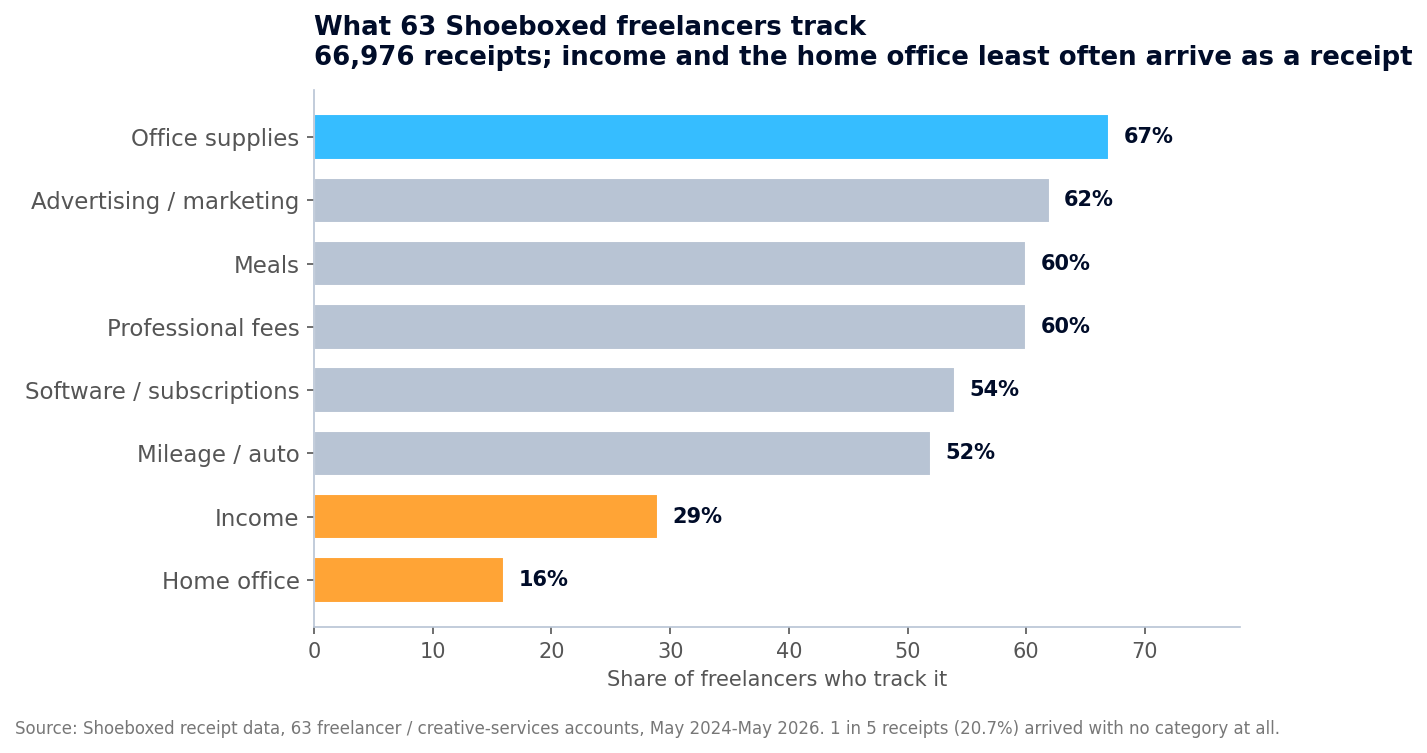 Across 63 Shoeboxed freelancer accounts and 66,976 receipts, income and the home office are the two things that least often arrive as a scanned receipt, partly because neither one is a receipt in the first place. Roughly 1 in 5 receipts came in without a category.
Look at the bottom two bars, income and the home office. Here's the honest read first: neither a client deposit nor a home office calculation shows up as a normal receipt, so neither one lands in a receipt tool the way a coffee or a gas receipt does. That's part of why only 29% of these accounts logged any income and only 16% logged a home office expense. And a deduction that never shows up as a receipt is exactly the kind you forget when you file, which is why the spreadsheet gives income and the home office their own spots.
Your pay is the clearest case. It shows up as a deposit or an invoice marked paid, never a receipt, so it never falls into the same pile as the expenses you save.
And a pile of expenses is only half a ledger. If you track what you spent and skip what you earned, the profit number you hand your accountant is half made up. The spreadsheet has the income side built right in, so you log each payment when it lands and the sheet shows your true profit. A clean record of both sides, backed by your receipts, is exactly what the IRS wants to see.
The home office gap is plain money left on the table, and that's the next section.
The home office deduction most freelancers skip
If you work from home, the IRS lets you deduct the part of it you use for the business. A lot of freelancers skip the deduction anyway, because they've heard a home office is an audit magnet. That story is stale. The IRS now builds a simplified method right into the form. What keeps you out of trouble isn't skipping the deduction, it's following one real condition:
"Allowed only if that portion is exclusively used on a regular basis for business purposes."
Exclusively means that spot is for work and nothing else. The spare room you turned into a studio counts. The kitchen table where the family also eats dinner does not.
Meet that test, keep a simple record of the space (something like "spare bedroom, 11 by 12 feet, desk and client files, no other use"), and the deduction is yours to take. Then you pick one of two ways to figure it, and the spreadsheet handles both.
The simplified method is the easy one, and it works off a flat rate the IRS sets:
"Standard deduction of $5 per square foot of home used for business (maximum 300 square feet)."
So a 200-square-foot office is a $1,000 deduction, and the 300-square-foot cap works out to $1,500. No receipts, no math past one multiplication.
The actual method usually pays more, especially if you rent or carry a mortgage. You figure what share of your home the office takes up, your office square feet divided by the home's total square feet, so a 150-square-foot office in a 1,500-square-foot home comes to 10%. Then you deduct that share of your rent or mortgage interest, plus utilities, insurance, and repairs, with no $1,500 cap to stop you. You run it on Form 8829, and the IRS describes it like this:
"Use Form 8829 to figure the allowable expenses for business use of your home on Schedule C (Form 1040) and any carryover to next year of amounts not deductible this year."
The Home Office Log tab runs both methods side by side so you can see which one wins. Want it figured for you? Our home office calculator pulls your home's square footage from your address and works out the savings at your bracket. Either way, the deduction lands on line 30 of your Schedule C.
Mileage: the other deduction that hides from your receipts
Like the home office, the miles you drive for work never show up on a receipt, so they slip your mind. Try to remember every client meeting, supply run, and trip to the post office you drove last year, and those miles add up fast.
For 2026 the IRS lets you deduct 72.5 cents for every business mile you drive. Log 5,000 business miles in a year and that's $3,625 off your taxable income, for trips you were taking anyway. You skip the gas and repair receipts with this method and track only the miles. The rate changes most years, so check that page for the number for the year you're filing.
The IRS wants one thing here: a record of each trip with the date, where you went, why, and the miles. The Mileage Log tab gives you those four fields and multiplies by the rate for you, and the total lands on line 9 of your Schedule C. If you don't want to keep a log by hand, our mileage log template walks through the easier ways to do it, including letting the Shoeboxed app log the drives for you.
Every self-employed deduction, mapped to its Schedule C line
This is the part the spreadsheet you've been searching for usually skips. It lists the write-offs but never tells you where they go on the form. The Income and Expenses tab does both with a dropdown, and so does the table below. You don't have to memorize any of it. The spreadsheet fills in the line for you, and the table is here so you can see where your money lands.
| What you spent money on | Examples | Schedule C line |
|---|---|---|
| Advertising and marketing | Your website, ads, business cards, a portfolio site | Line 8 |
| Car and truck | Business miles, by the per-mile rate | Line 9 |
| Contract labor | A subcontractor, an editor, a virtual assistant you paid | Line 11 |
| Depreciation and equipment | Camera, computer, big gear (you can often write off the whole cost the first year) | Line 13 |
| Business insurance | Liability, errors and omissions | Line 15 |
| Legal and professional | Your accountant, a lawyer, a bookkeeper | Line 17 |
| Office expense | Printing, postage, small office costs | Line 18 |
| Rent or lease | Studio space, co-working, rented equipment | Line 20 |
| Repairs and maintenance | Fixing the gear you work on | Line 21 |
| Supplies | Materials you use up doing the work | Line 22 |
| Taxes and licenses | Business license, permits, professional dues | Line 23 |
| Travel | Flights, hotels, out-of-town work trips | Line 24a |
| Meals | Business meals, deductible at 50% | Line 24b |
| Utilities and phone | Business phone and internet, the business share | Line 25 |
| Software and subscriptions | Design tools, cloud storage, web hosting | Line 27a |
| Education and professional development | Courses, books, conferences in your field | Line 27a |
| Bank and merchant fees | Payment processing, business bank charges | Line 27a |
| Home office | The room you work in, simplified or actual | Line 30 |
| The spreadsheet uses these exact Schedule C lines, so when you hand your totals to your accountant, every number already knows where it goes. |
Two of these need a gut check. If you use your phone, your internet, or your car for both work and your own life, deduct only the business share, not the whole bill. For your car, that share is your business miles divided by the miles you drive all year. For your phone or internet, estimate the slice you use for work, say a third if that is about right, and jot down how you got there, even a line like "about a third of my calls and data are for clients," so you can back it up later. The IRS wants a reasonable number, not a stopwatch, and a couple of honest months of logging gives you one you can use all year. Pick the category from the dropdown in the spreadsheet and it carries the line number with it, so at tax time the totals are already sorted onto the form.
Big-ticket gear is worth a special mention. A camera, a computer, or other equipment can usually be deducted in full the year you buy it, instead of in pieces over the years. This is the Section 179 write-off, and it covers ordinary business gear well into six figures a year, so a single camera or laptop sits well under the limit. That's a real cash boost the year you invest, and your accountant can confirm it for your situation.
One housekeeping note: the IRS renumbers a line now and then, so check yours against the Schedule C for your filing year. The categories don't change, only the line they sit on.
How you lose the deduction
I've watched good people hand real money back to the IRS over small bookkeeping slips. Here are the four I see most in our data, and you can avoid all of them.
Receipts with no category. About 1 in 5 receipts in our freelancer data sat without a category. How you lose the deduction: at audit time, the IRS throws out a charge you can't explain faster than anything else on the return. Tag it the day you get it, not next April.
Mixing business and personal in one account. When the client deposit and the grocery run live in the same checking account, tax time turns into a treasure hunt through a year of mixed-up charges. How you lose the deduction: you can't prove a charge was for business, so you skip it instead of guessing, and you overpay. Run a separate business account and card.
Never logging your income. This is the big one, because a payment lands as a deposit and never as a receipt, so it rarely gets written down. Plenty of freelancers track every expense and never record what they made. How you lose the deduction: with no income record your profit is a guess, and the IRS doesn't accept guesses. Log each payment the day it clears.
Faded receipts. The thermal paper most receipts print on goes blank inside a year. How you lose the deduction: the print fades to gray before your return is even due, and a blank slip proves nothing. Snap a photo the day it prints, and the digital copy outlives the paper.
The easy way: skip the spreadsheet
The spreadsheet is free and it works, and I stand behind it. But I'll be honest about the catch. Someone still has to type every receipt into it and log every payment, and our data shows what happens when that turns into a chore. Receipts go untagged, income never gets recorded, and the books drift.
That's the whole reason Shoeboxed exists, because we do the typing for you. We're a 20-year-old receipt scanning and mileage tracking app. Snap a receipt with the iPhone app or the Android app, forward an email, or mail us a shoebox of paper in our Magic Envelope. Our team in Durham scans the paper and pulls out the date, total, vendor, and category, so every business cost lands in your account already sorted.
The mileage piece is my favorite. The app tracks your drives by GPS, texts you the list at the end of the day, and you reply with which ones were business, so a tax-ready mileage log comes together without you keeping it by hand.
Either way, the spreadsheet is yours, no signup and no strings. If you'd like your receipts captured and sorted for you, that's what we do. Shoeboxed Pro runs $29 a month with a 30-day risk-free guarantee. Scan a year of receipts, and if it isn't for you, we refund the money.
Frequently asked questions
What is the best spreadsheet for self-employed income and expenses? The one that tracks both sides, income and expenses, and ties each expense to its tax-form line. Most free spreadsheets track spending only, which leaves you with half a ledger. The free template on this page logs income at the top, expenses at the bottom, maps every category to its Schedule C line, and shows your real net profit.
How do I track income and expenses when I 'm self-employed? Log every payment as it comes in and every business cost as you spend it, and keep both in one place so your profit stays current. The free spreadsheet here does the subtraction for you, and the Shoeboxed app can capture the receipts for you if you don't want to type them in.
What can I deduct as a self-employed person? Advertising, your business phone and internet, software, supplies, contract labor, business travel and meals, equipment, the miles you drive for work, and a home office, among others. The table above maps each one to its Schedule C line.
Do I qualify for the home office deduction? If you use part of your home regularly and only for work, yes. It doesn't have to be a whole room, but the space can't double as anything else. You can take a flat $5 per square foot up to 300 square feet, or run the actual method on Form 8829 for a bigger deduction. Our home office calculator figures it from your address.
How long should I keep my records? Three years in the normal case, counted from the date you filed, and longer in a few situations. Keep the digital scan and you can toss the fading paper.
30 Seconds Could Save You Thousands on Taxes
Self-employed? Get an instant, personalized tax-savings estimate.




 4.4 / 5 on