Construction Expense Tracker (Free Google Sheet, Excel & PDF)
A free construction expense tracker for contractors who file a Schedule C. Every category mapped to its tax line, plus the equipment write-off and the materials mistake most contractors make.


A construction expense tracker should do one job: show you what you can write off, and where each cost lands on your tax return. Most of the trackers online don't do that. They're project-budget spreadsheets built to price a job, not to catch your deductions, and not one of them tells you the rule that puts the most money back in your pocket.
I'm not a contractor. But I run Shoeboxed, a receipt-scanning company, and we've scanned receipts for thousands of contractors over the last 20 years. I pulled the numbers on what they spend, built a tracker around them, and made it free.
It covers every cost a contractor can deduct and maps each one to the right Schedule C line. It also bakes in the two rules contractors miss most: the full first-year write-off on new tools, and the home office you probably think you don't qualify for.
Get the tracker
Copy the tracker to my Google Drive →
Tap it, sign in to Google, and choose Make a copy. The sheet is yours to type in, and nothing you enter touches my version.
Want another format? Download it as Excel (xlsx), or print the PDF and fill it in by hand in the truck.
The tracker has four tabs:
- Expense Tracker. Every category a contractor can deduct, with a column for your yearly total and the Schedule C line it belongs on. Type in your income and it shows your net profit.
- Home Office Log. The deduction most contractors skip because they think working on-site disqualifies them.
- Mileage Log. For the personal truck you drive between job sites, the supply house, and the bank.
- A 25% off code for Shoeboxed, in case you'd like us to do the typing.
If you only do one thing on this page, copy the tracker. The rest of this article explains the rules behind it, because a couple of them are worth real money.
What a contractor can deduct, line by line
Contractors spend more at the building-supply counter than anywhere else. We pulled the receipts from 1,797 working contractors going back more than a decade, and Home Depot was their most-scanned vendor by a wide margin. About a third of the receipts they keep come from places like that.
And almost none of them label it. Out of those 1,797 contractors, fewer than 70 ever tagged a single receipt as "Materials," and about one in four receipts had no category at all. So the biggest, cleanest deduction a contractor has, the lumber and concrete and fixtures that go straight onto the job, is the one most likely to end up in a "what was this?" pile come tax time.
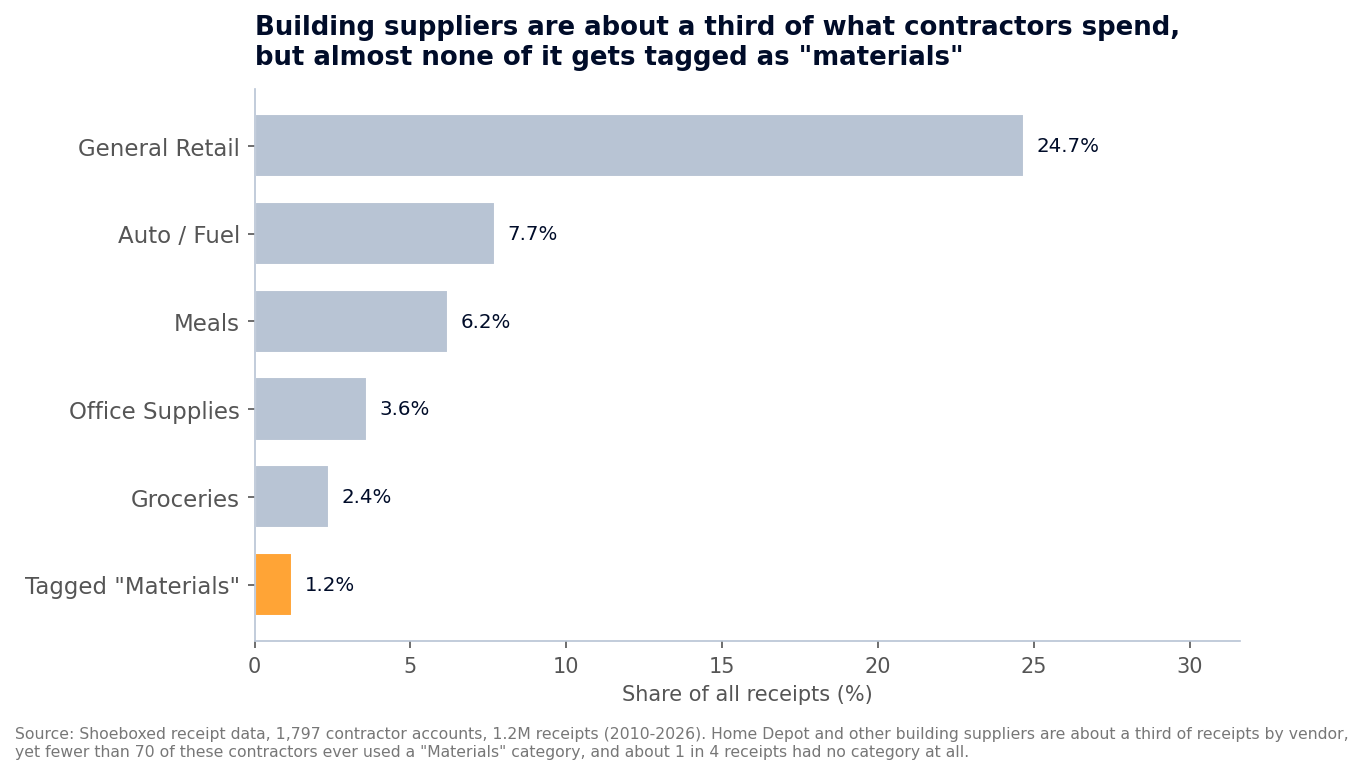 Across 1,797 contractor accounts and 1.2 million receipts, building suppliers are about a third of the spending by vendor, but the "Materials" category almost never gets used. About 1 in 4 receipts had no category at all.
So this tracker pre-labels every category with the Schedule C line it belongs on. Here's the full list.
| What you spent money on | Schedule C line |
|---|---|
| Job materials (lumber, concrete, fixtures, hardware) | Supplies (line 22) |
| Subcontractor labor | Contract labor (line 11) |
| Tools & equipment (machine, trailer, compressor) | Depreciation (line 13) |
| Equipment & tool rental | Rent or lease (line 20a) |
| Truck/van fuel & repairs (actual method) | Car & truck (line 9) |
| Liability & workers' comp insurance | Insurance (line 15) |
| Permits, licenses & inspection fees | Taxes & licenses (line 23) |
| Dump fees & debris disposal | Supplies (line 22) |
| Phone & internet (business portion) | Utilities & phone (line 25) |
| Legal & professional (CPA, attorney) | Legal & professional (line 17) |
| Advertising (yard signs, truck wraps, ads) | Advertising (line 8) |
| Home office | Line 30 |
| The tracker uses these exact Schedule C lines, so when you hand your totals to your accountant, every number already knows where it goes. |
One note on the materials line. If you carry inventory or a job runs heavy on materials, your accountant may put some of that cost in Cost of Goods Sold instead of Supplies. The deduction counts either way; only the line changes. When in doubt, ask them which fits your books.
A few of these get their own tab in the tracker, because they don't work like a normal receipt. The next three sections cover them.
The equipment rule that writes off the whole thing in year one
Most contractors lose money here without knowing it, because they assume a big purchase has to come off slowly over years.
Say you buy a $60,000 skid steer, or a $15,000 trailer, or a fresh set of tools this year. The old assumption says you deduct a slice each year for five or more years. You can do that, but you usually don't have to, because the IRS gives you a faster option.
Section 179 lets you deduct the full cost of qualifying tools and equipment the year you buy them, instead of spreading it out. IRS Publication 946 sets the 2026 cap high enough that no small contractor will hit it:
For tax years beginning in 2026, the maximum section 179 expense deduction is $2,560,000.
Bonus depreciation does the same job, and for 2026 it's back to full strength. The same Publication 946 covers it:
100% special depreciation allowance for certain qualified property acquired and placed in service after January 19, 2025.
The date matters: the 100% write-off applies to equipment you put to work after January 19, 2025, so check your purchase date before you count on it. Either way, a skid steer, a trailer, or a compressor can come off your taxable income the year you put it to work.
| How you write off a $60,000 skid steer | Year-one deduction |
|---|---|
| Spread it out the old way (regular depreciation) | A portion each year |
| Section 179 or 100% bonus depreciation | $60,000 |
| Same machine, same money out the door. Regular depreciation gives you a portion each year, spread across the schedule the IRS assigns that equipment. Section 179 or bonus depreciation gives you the whole amount up front. Put the figure on the Tools & equipment line in the tracker. |
Section 179 can't take your business below zero for the year, so if a big purchase would create a loss, that's a good question for your accountant. Bonus depreciation can create a loss, which is why the two rules exist side by side.
How you lose the deduction: no record of what you paid and when you put it to work. Keep the purchase invoice and the in-service date for anything you depreciate, and keep it longer than your other receipts, because you'll need it to back up the write-off for years.
The home office most contractors think they can't claim
Your work happens on the job site, so a home office sounds like it's not for you. It probably is.
The IRS lets you claim a home office if you use a space in your home regularly and only for the business side of the work: bidding jobs, sending invoices, ordering materials, keeping your books. Publication 587 spells it out:
Your home office will qualify as your principal place of business if you meet the following requirements. You use it exclusively and regularly for administrative or management activities of your trade or business. You have no other fixed location where you conduct substantial administrative or management activities of your trade or business.
You build on-site, but you run the business from the spare room. If you use that room only for the business, it counts, even though the hammers swing somewhere else.
You can claim it two ways. The simplified method pays $5 a square foot up to 300 square feet, so up to $1,500 with no receipts to chase.
The actual method can save you more, because it takes a slice of your real mortgage interest, utilities, insurance, and repairs based on your office's share of the house. It's more paperwork, and the depreciation you claim gets added back and taxed when you sell the house, so it's worth a word with your accountant.
Either way, the deduction can't be more than your business made that year. The Home Office Log tab figures both methods and keeps the bigger one.
How you lose the deduction: using the room for anything else. A desk in the corner of the den where the kids also do homework fails the "exclusive use" test. A spare room that's only the business office passes it.
To get an instant estimate from your address, the free home office calculator does the math in about 30 seconds.
Your truck: cents per mile, or actual costs?
Which way you deduct a vehicle depends on the truck, and contractors usually run both kinds.
Take the personal pickup or van under 6,000 pounds you drive on errands, to the supply house, and to the bank. That one can use the standard mileage rate. For 2026 the IRS lets you deduct 72.5 cents for every business mile:
Beginning Jan. 1, 2026, the standard mileage rates for the use of a car, van, pickup or panel truck will be: 72.5 cents per mile driven for business use, up 2.5 cents from 2025.
Log the trip, the miles, and the reason on the Mileage Log tab, and the sheet multiplies it out.
For a heavy work truck over 6,000 pounds , a one-ton dually or a dump truck, the cents-per-mile rate is off the table. Publication 463 draws the line:
Its unloaded gross vehicle weight (for trucks and vans, gross vehicle weight) must not be more than 6,000 pounds.
A heavy truck deducts actual costs instead: fuel, repairs, tires, insurance, depreciation. For a working truck those add up fast, so this is usually the bigger deduction anyway. Those costs go on the Car & truck and Tools & equipment lines, not the Mileage Log.
How you lose the deduction: running the wrong method for the wrong truck. Keep the personal pickup on the mileage log and the heavy rig on actual costs, and you collect on both.
Paid a sub? You may owe a 1099
If you hired help this year, the labor you paid out is one of your biggest deductions. It goes on the contract labor line, but a form comes with it.
If you paid any one subcontractor by cash, check, or bank transfer, you may have to file a Form 1099-NEC for them. The dollar line just moved, so the year matters:
- For 2025 pay (the 1099 you file in early 2026): the threshold is $600.
- For 2026 pay (filed in early 2027): the new tax law raised it to $2,000 , and it rises with inflation after that.
The change comes from the 2025 budget law, which lifted the long-standing $600 line to $2,000 for payments made after December 31, 2025. You can read the amended tax code section yourself.
One exception either year: if you paid a sub by credit or debit card, the card processor reports it, so you skip the 1099 on those payments. The move that makes the rest painless: get a filled-out W-9 from every sub before you write the first check. Then you have their legal name, address, and tax ID on hand in January instead of chasing a guy who's three jobs away by then.
How you lose the deduction: paying subs in cash with no record. A labor cost you can't document is the first thing an auditor throws out. Write the check or keep the record, and file the 1099.
Your Schedule C business code
Filing your Schedule C, you'll need a principal business code, and contractors stall picking between residential and nonresidential. For the trades, the IRS code list gives you one for each:
- 236200 for nonresidential building construction
- 236100 for residential building construction
- 238210 for electrical contractors
- 238220 for plumbing, heating, and air-conditioning contractors
- 238160 for roofing contractors
- 238110 for poured concrete foundation and structure contractors
- 238320 for painting and wall covering contractors
- 238990 for all other specialty trade contractors
Pick the one that fits your trade and move on.
The recordkeeping mistakes that cost contractors
These are the traps I see in the data and hear about from the trades. You can avoid all of them once you know they're there.
Materials with no category, the big one. Building suppliers are about a third of a contractor's receipts, yet fewer than 70 of the 1,797 contractors in our data ever tagged one as materials. How you lose the deduction: a Home Depot receipt sitting in a "what was this?" pile is the easiest thing for the IRS to question. Tag it the day you get it.
Mixing the business and the personal. When job materials and the family grill run through the same card, you can't tell what's deductible. How you lose the deduction: a business cost buried in a personal account with no clear record is the first thing an auditor disallows. Run a separate business checking account and card.
Faded materials receipts. Thermal paper from the supply counter goes blank inside a year. How you lose the deduction: the print fades to gray before your return is even due. Snap a photo the day it prints, and the digital copy outlives the paper.
 Thermal receipts from the supply counter fade to gray inside a year. A photo taken the day it prints outlives the paper. Illustrative photo, not an actual customer receipt.
(More on keeping a clean construction receipt trail.)
No proof of an equipment purchase. How you lose the deduction: you write off a new machine under Section 179, then can't show the invoice three years later. Keep anything tied to depreciated equipment as long as the IRS could still audit that year, which can run six years or more.
The easy way is to skip the shoebox
I built this tracker and I stand behind it. But I'll be honest: the typing is the part nobody enjoys, and our data shows what happens when it becomes a chore. Receipts go untagged, materials get lumped into "general retail," and the books drift.
That's exactly why Shoeboxed exists, because we do the typing for you. We're a 20-year-old receipt scanning and mileage tracking app. Snap a materials receipt at the supply counter, forward an email, or mail us a shoebox of paper in our Magic Envelope. Our team in Durham scans the paper ones and pulls out the date, total, vendor, and category. Your materials, fuel, and tools land in your account, sorted and ready to drop into a tracker like this one.
The mileage piece is my favorite for the personal truck. The app tracks your drives by GPS, texts you the list at the end of the day, and you reply with which ones were business. A tax-ready mileage log builds itself. The full writeup lives in our mileage log template article.
Either way, the tracker is yours, free and no strings. If you'd like your receipts captured and sorted for you, that's what we do. Shoeboxed Pro runs $29 a month with a 30-day risk-free guarantee. Scan a season of materials receipts, and if it isn't for you, we refund the money.
Start a Shoeboxed account → or grab the iPhone app or the Android app.
If you want to dig deeper on the job-by-job side, our construction job costing guide covers tracking costs per project, and construction bookkeeping walks through keeping the books clean all year.
Frequently asked questions
What should a construction expense tracker include? Every cost a contractor can deduct, with the Schedule C line each one belongs on: materials, subcontractor labor, tools and equipment, fuel and repairs, insurance, permits, dump fees, phone, and a home office. This free tracker lists all of them and adds up your net profit.
Can I write off new equipment all at once? Usually yes. Section 179 and 100% bonus depreciation both let you deduct the full cost of qualifying equipment the year you put it to work, instead of spreading it over years. Section 179 can't create a loss for the year; bonus depreciation can. Vehicles have their own limits depending on weight, so ask your accountant which rule fits a big purchase.
Do contractors qualify for the home office deduction? Often, yes. Even though you work on-site, you qualify if you use a space at home regularly and only for the business side, like bidding, invoicing, and bookkeeping, and you have no other fixed office for that work.
Do I have to send subcontractors a 1099? It depends on the year and the amount. For pay during 2025 the threshold is $600; for pay during 2026 the new tax law raised it to $2,000. Either way, payments by credit or debit card don't count, since the card processor reports those. Get a W-9 from every sub before you pay them so you have what you need to file.
How long should I keep my records? Three years in the normal case, counted from the date you filed. It stretches to six years if you leave off more than a quarter of your income, and there's no limit if you never filed. Hang on to anything tied to equipment you depreciated longer still, since you'll need it to back up the write-off. Keep the scan and you can toss the fading paper.
30 Seconds Could Save You Thousands on Taxes
Self-employed? Get an instant, personalized tax-savings estimate.




 4.4 / 5 on